Everything Optima
does for your day.
Nine tools, built to work as one. Scroll through each — then grab it for a one-time $19.
Explore Optima01 / 06
Tasks
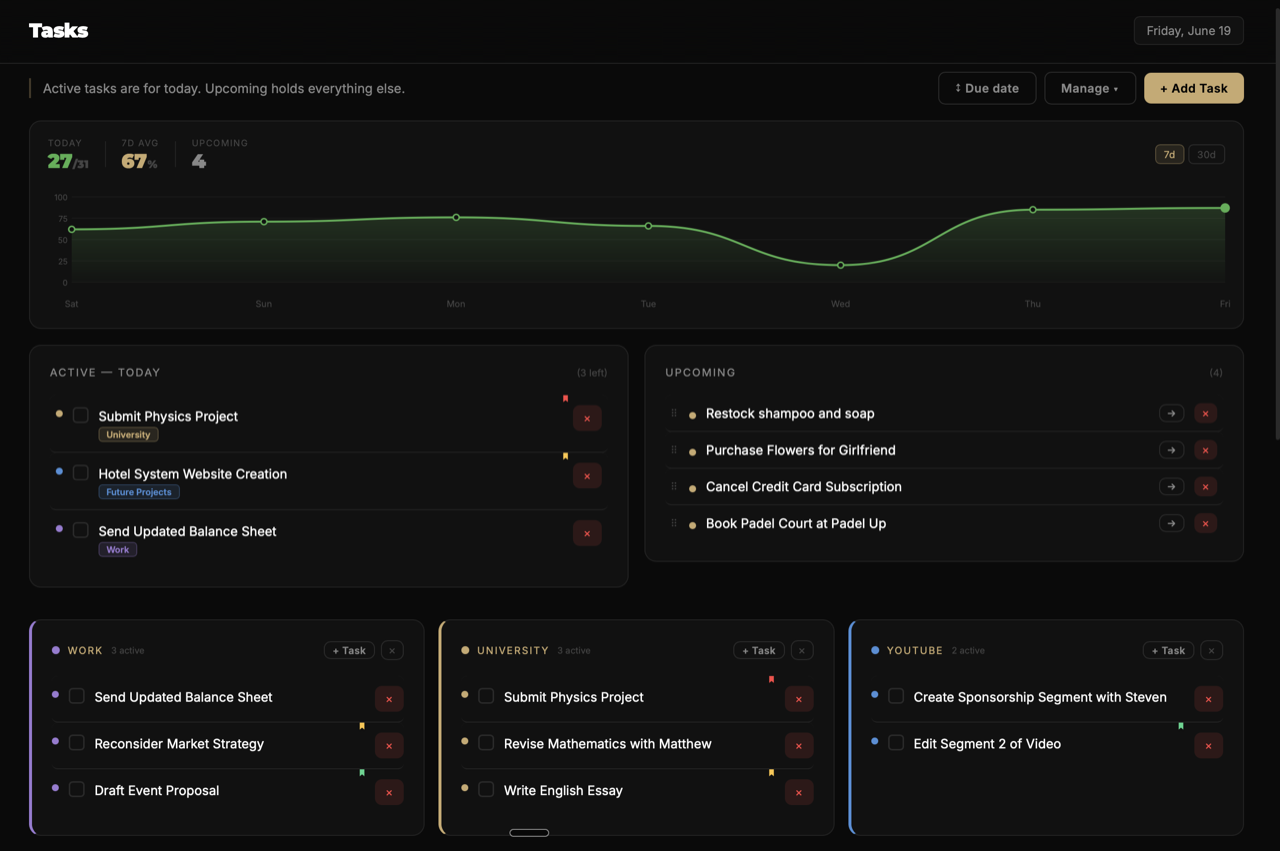
Drag what matters
into today.
An Active / Upcoming split keeps today clean. Pull a task from any project folder into focus — same task, two places, done once.
- Active Today vs. backlog
- Drag from any folder
- Priority dots + manual order
Spaces — the canvasThink on an infinite canvas.
Think on an infinite canvas.
Then act on it.
Optima's most developed feature is a genuinely fluid whiteboard — in the spirit of Apple Freeform. Drop notes, connect ideas, sketch with the pen, then turn a planning canvas straight into your task list.
- Pannable, zoomable canvas with a dot-grid that scales seamlessly
- Auto-sizing notes, image nodes & edge-anchored connectors that redraw live
- Pen, two-mode eraser, drag-and-drop coloring, action-based undo/redo
- Spaces surface as task folders — plan visually, then do the work
🎯 Launch Optima 1.0
Landing page
Demo reel
Creator codes
Press kit
Brand assets
Built for the keyboard
Never reach for the mouse.
Every section has a single-key shortcut. Hint badges teach you as you go, then fade once they're second nature.
DDashboardTTasksHHabitsFDeep WorkSSpaces␣Focus timerPPen tool⌘ZUndo anything
Make it yours
Your accent. Pick one — watch it change.
Just like in Optima. Tap a colour and the whole site recolours live.
The whole stack, in oneSix apps' worth of features.
Six apps' worth of features.
One window. One payment.
Optima
Notion
Todoist
Things 3
Tasks & projects
Habit streaks
Deep-work timer
Visual time blocking
Goals with progress
Daily journal
Infinite canvas (Spaces)
Keyboard-first
Works fully offline
Pay once — no subscription
Comparison reflects core, out-of-the-box features as of 2026.
One window. Pay once.
All nine tools, on Mac & Windows, for a single payment.